


Libby: Read Library Books
4.868.76K Reviews
App Specs
- Version
- 9.4.0
- Updated On
- License
- Free
- Downloads
- 10,000,000+
- Developer
- OverDrive, Inc.
- Categories
- Books & Reference
- Platform
- Android, iOS
Screenshots
 Analysis by AppCompare
Have you ever found yourself craving a good read but don’t want to lug around a pile of books? Enter Libby, the Library App. This nifty little app is a lifesaver for all the bookworms out there who love reading on the go but can’t carry a library around in their backpack. Let’s dive into what makes Libby a must-have for book lovers.
Where setup can slow you down
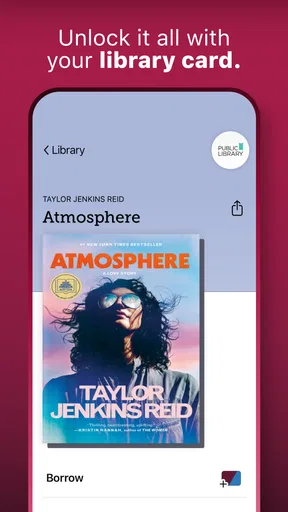
The first hurdle is not usually using the reader; it is getting connected to a library that lends digital books through Libby. You’ll need a library card, and the app’s usefulness depends on what your library makes available. If you have a card but are unsure whether it works, check your library’s own instructions or ask its staff before assuming the app is broken. Library access is the doorway, not a subscription you can skip past.
That distinction matters when a search turns up fewer titles than you expected. Libby is a Books & Reference app from OverDrive, Inc., but it does not make every book available to every borrower instantly. Digital collections and borrowing rules belong to the library. A title may be missing from your library’s collection or already on loan, in which case a hold is the sensible next step rather than repeatedly searching for a different version of the same book.
Simple checks before you borrow
I’d start by confirming that you have the right library selected and that the card details are current. If you use more than one participating library, keep track of which collection you are browsing; the same title can have different availability in different collections. This is a small bit of organization that saves time later, especially if you are searching for a particular audiobook or a book you need soon.
Libby is free, and its 4.8 average from around 627,000 ratings suggests that many readers find the basic arrangement worthwhile. Still, free access does not mean every title is immediately available. Before building a reading plan around one book, look at whether you can borrow it now or need to wait. For a deadline, it is wise to have another title ready rather than counting on a hold arriving on a particular day.
The app is rated Teen, and it runs on operating systems from version 7.1 onward. Its current version is 9.0.0. If the app behaves oddly, checking that your device meets the minimum requirement and that the installed app is up to date is a reasonable first move. Libby has more than 10 million installs, but broad use cannot guarantee that every older device or every local library setup will feel equally smooth.
Using Libby in everyday reading
I find Libby works best when I treat it as a flexible reading shelf rather than a place to demand one exact title at the last minute. In this section, I’d focus on choosing something available for today while letting holds handle books I can wait for; that small habit makes the app feel far more useful in an ordinary week.
Worth Reading Before You Choose

Flipboard Shows What News Apps Must Do Beyond the Feed

Switching to Android Auto Means Rethinking Your Driving Routine

Google Calendar Makes a Crowded Week Easier to Manage

Ludo King Makes the Most of the Minutes Between Plans

Baby Panda World Brings Quick Play to Modern Phones, but Its Game Library Feels Busy

ESPN’s Live Game View Makes Following Close Games Easier
Browsing with a purpose
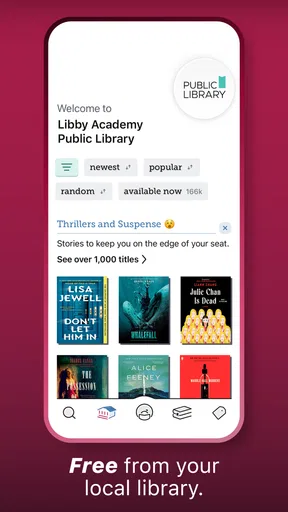
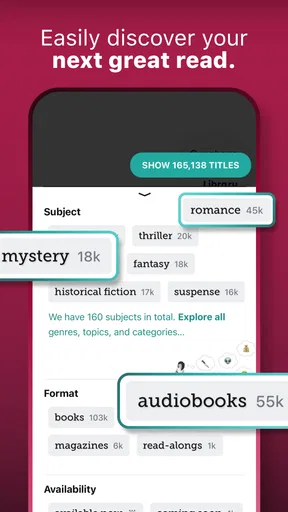
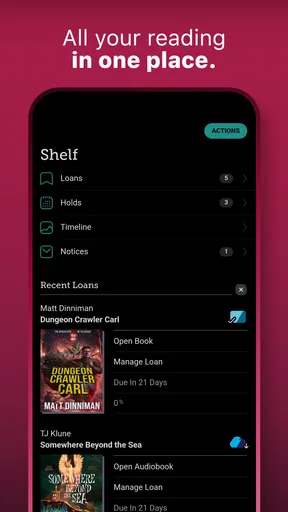
One of the coolest features is how easy it is to browse and borrow. You can search for books by title, author, or genre. Plus, Libby offers recommendations based on your reading habits, which is a great way to discover new authors or genres you might not have considered before. Once you find a book you like, borrowing is just a tap away. And if the book you want is already checked out, no worries! You can place a hold and get notified when it’s your turn.
A practical trick is to separate browsing from urgent reading. When I am choosing something for a commute, I would first look for a title that is available now; for a book I am curious about but do not need immediately, I would place a hold and keep browsing. That avoids turning a promising recommendation into a last-minute scramble. Holds also make Libby a better fit for readers who are happy to plan ahead than for someone who expects every popular release to be ready on demand.
For a realistic weekday routine, imagine picking an audiobook during breakfast, borrowing it if available, and downloading it before leaving home. Later, you can listen during a walk or while doing chores, then switch to an ebook in the evening if that suits you better. The value is not simply having books on a phone; it is being able to fit library reading into short gaps that would otherwise go unused.
Making the reading session comfortable
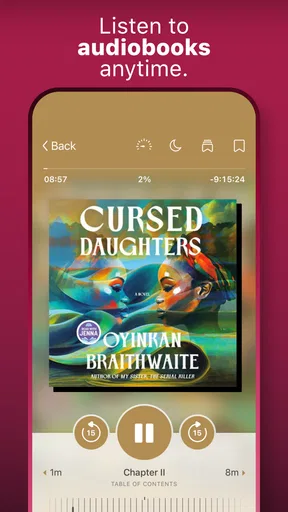
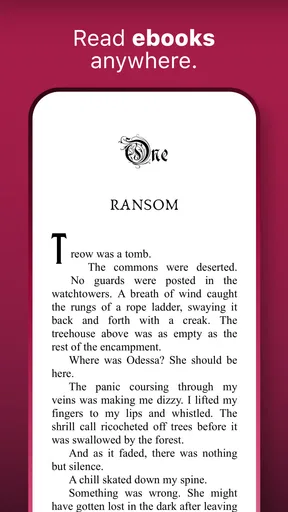
Reading on Libby is a delight. You can customize the reading experience to suit your preferences. Adjust the font size, background color, or switch to dark mode for late-night reading sessions. For audiobook listeners, you can alter playback speed and set sleep timers, which is perfect for those who enjoy listening before bed.
Those controls are useful in different situations, not just for comfort. A larger font can make reading easier when you are tired or holding your phone at a distance, while a sleep timer helps avoid losing your place if you nod off to an audiobook. If you speed up narration, try a modest change first: a pace that works for a familiar narrator may make a dense nonfiction book harder to follow. The best setting depends on the material, so adjusting it from one title to another is worth the few taps.
Compared with buying an ebook or audiobook from a commercial storefront, Libby’s main trade-off is availability. A store is often more direct when you want a specific title immediately, while Libby can be a better first stop if you already have library access and are willing to borrow or wait. Compared with a physical library visit, it saves the trip and lets you read digitally, but it cannot replace browsing shelves or borrowing print books.
Keeping your place and planning for offline time
Another feature that’s worth mentioning is the ability to sync across devices. Whether you’re reading on your phone, tablet, or e-reader, Libby keeps your place, so you never lose your spot. This cross-platform functionality ensures a seamless reading experience, no matter where you are.
If you move between devices, it helps to open the same borrowed title in the place where you intend to continue and give it a moment to catch up. Syncing is convenient, but it is not a reason to assume that every change will appear instantly in every situation. For a reader who mostly uses one device, this matters less; for someone switching between a phone during the day and a tablet at night, it can make longer books easier to manage.
Let’s face it, we don’t always have access to Wi-Fi, especially when traveling. The good news is Libby allows you to download books for offline reading. So, whether you’re on a plane or in a remote area, your favorite books are always accessible.
For a trip, I would download the borrowed title while connected and open it before leaving, rather than waiting until boarding or reaching a place with weak reception. This is a simple workflow check, not a guarantee that every connection problem is caused by the app. If a download stalls, first make sure the device has a usable connection and enough room for the file, then try again. If the problem continues, checking the library’s help guidance is more useful than repeatedly tapping the same control.
When a different option makes more sense
Libby suits readers who enjoy ebooks or audiobooks, have access to a participating library, and do not mind that a particular title might require a hold. It is especially handy for people who want to sample unfamiliar authors without making every discovery a purchase, or who listen in small stretches throughout the day. Its free library-borrowing approach is a genuine advantage when the selection matches your interests.
I would look elsewhere if you need guaranteed, immediate access to one specific book, prefer print, or do not have a library card that works with a Libby collection. A paid ebook or audiobook service may be less frustrating when immediacy matters more than borrowing, while a local library’s physical collection may suit readers who want paper books. Those alternatives are not automatically better; they solve different problems.
If a title will not appear, a loan will not start, or a download seems stuck, it is worth checking the basics in order: confirm the selected library, make sure your card access is in order, check the connection, and reopen the title after the issue has cleared. If the obstacle is a waitlist or a title your library does not carry, changing device settings will not fix it. Recognizing that difference can save a lot of needless troubleshooting.
Wrapping Up
In a nutshell, Libby is a game-changer for anyone who loves reading but doesn’t want to be tied down by physical books. It’s like having a personal library in your pocket. With its easy-to-use interface, personalized features, and extensive library access, it’s no wonder this app has become a favorite among readers worldwide. So, grab your library card and dive into the world of Libby today!
My practical verdict is that Libby is worth trying if you already use a library or are willing to arrange a card and can be flexible about availability. I like it most as a low-friction way to keep a book or audiobook close at hand, especially when offline downloads and adjustable reading or listening settings fit naturally into the day. Just treat the library collection and its lending schedule as part of the experience, not as a glitch to overcome, and it becomes much easier to decide whether Libby is the right reading companion for you.
Pros
- User-friendly interface for easy navigation.
- Access to a wide range of eBooks and audiobooks.
- Offline reading available for convenience.
- Syncs across multiple devices seamlessly.
- Customizable reading settings enhance experience.
Cons
- Requires a library card for access.
- Limited availability of some popular titles.
- Occasional syncing issues between devices.
- Audiobook playback can be glitchy.
- No option for adding personal notes.
FAQs for Libby: Read Library Books
What is Libby, and how does it work?
Libby is a user-friendly app that allows you to borrow ebooks, audiobooks, and magazines from your local library's digital collection. By connecting your library card, you can browse, check out, and download titles directly to your device. The app provides a seamless reading and listening experience with custom settings for text size, background color, and audio speed.
Do I need a library card to use Libby?
Yes, a valid library card from a participating library is required to access Libby’s services. If you don't have one, you can typically sign up for a library card online or in-person at your local library. Once you have your card, simply enter your library credentials in the app to start borrowing digital content.
Is Libby available for all devices?
Libby is compatible with a wide range of devices, including Android and iOS smartphones and tablets. You can download the app from the Google Play Store or Apple App Store. Additionally, Libby can be accessed via web browsers on computers, ensuring flexibility in how you read or listen to your borrowed materials.
Are there any costs associated with using Libby?
Libby itself is a free app, and borrowing materials through the app is also free as long as you have a library card from a participating library. However, you might incur data charges if you download large files without a Wi-Fi connection. Always check with your internet service provider for any potential costs.
How long can I keep borrowed items from Libby?
The loan period for ebooks, audiobooks, and magazines on Libby varies depending on your library's policies, typically ranging from 7 to 21 days. Items are automatically returned at the end of the loan period, so you won’t incur late fees. You can also renew items if more time is needed, provided there are no holds.


